Scheduling COVID-19 Injection Activities
Scheduling a COVID-19 injection activity is recommended when a patient wants to book an appointment ahead of time to get the vaccine.
Types of Activities
Two types of COVID-19 injection activities can be scheduled in the Activities tab:
-
COVID-19 Injection - used to schedule the 1st dose of the COVID-19 vaccine.
-
COVID-19 Injection Follow-up - used to schedule subsequent doses of the COVID-19 vaccine.
Benefits of Scheduling Activities
When a COVID-19 injection activity is scheduled, your pharmacy can:
-
Track when patients are coming in for scheduled appointments. This helps you plan the proper inventory levels of the vaccine and schedule staff.
-
Process prescriptions directly from the scheduled activity with information auto-populated. This saves you time from creating and entering prescription information from scratch.
COVID-19 injection activities can only be completed by processing the COVID-19 prescription from the scheduled activity.
Methods of Scheduling Activities
There are two methods for scheduling COVID-19 injection activities. Use the dropdowns below to learn about each option.
 Activities Tile
-
On the Workbench, select the Activities tile.
-
Select New. A window opens to create a new activity.
-
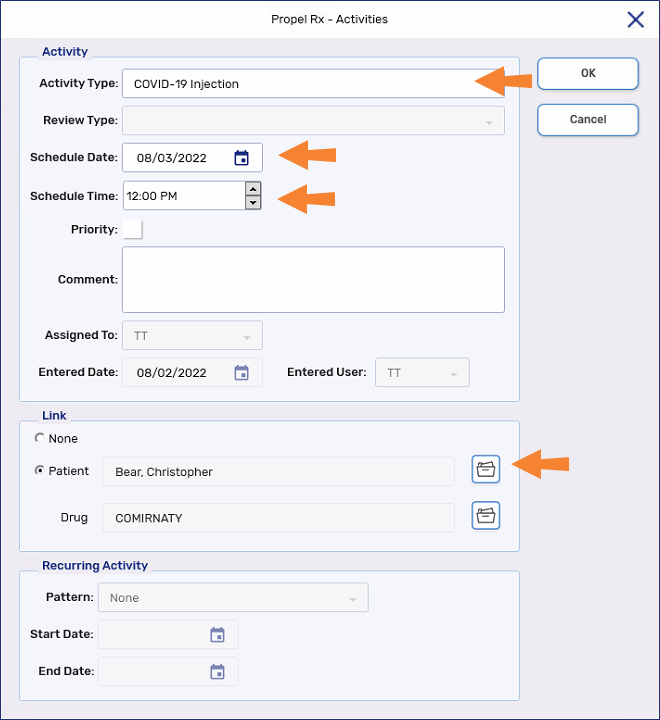
In the Activity section, enter the following information:
-
Activity Type = COVID-19 Injection (1st dose) or COVID-19 Injection Follow-up (subsequent doses)
-
Schedule Date = date of the appointment
-
Schedule Time = time of the appointment
-
-
In the Link section, select the folder buttons
 to search for the following information:
-
Patient - patient receiving the COVID-19 vaccine
-
Optional: Drug - COVID-19 vaccine being administered. If this is unknown, the vaccine can be selected later by detailing the activity or when processing the prescription
-
-
Select Save. The activity can now be viewed in the Activities tile on the day it was scheduled. The patient's name, phone number, and COVID-19 vaccine display in the Comments column for easy reference.

COVID Injection Window
When processing a COVID-19 vaccine prescription, a COVID-19 Injection Follow-up activity can be scheduled from the COVID Injection window, under the Schedule Follow-up Injection section. The vaccine used in the initial dose is assumed for the follow-up dose, unless manually changed.
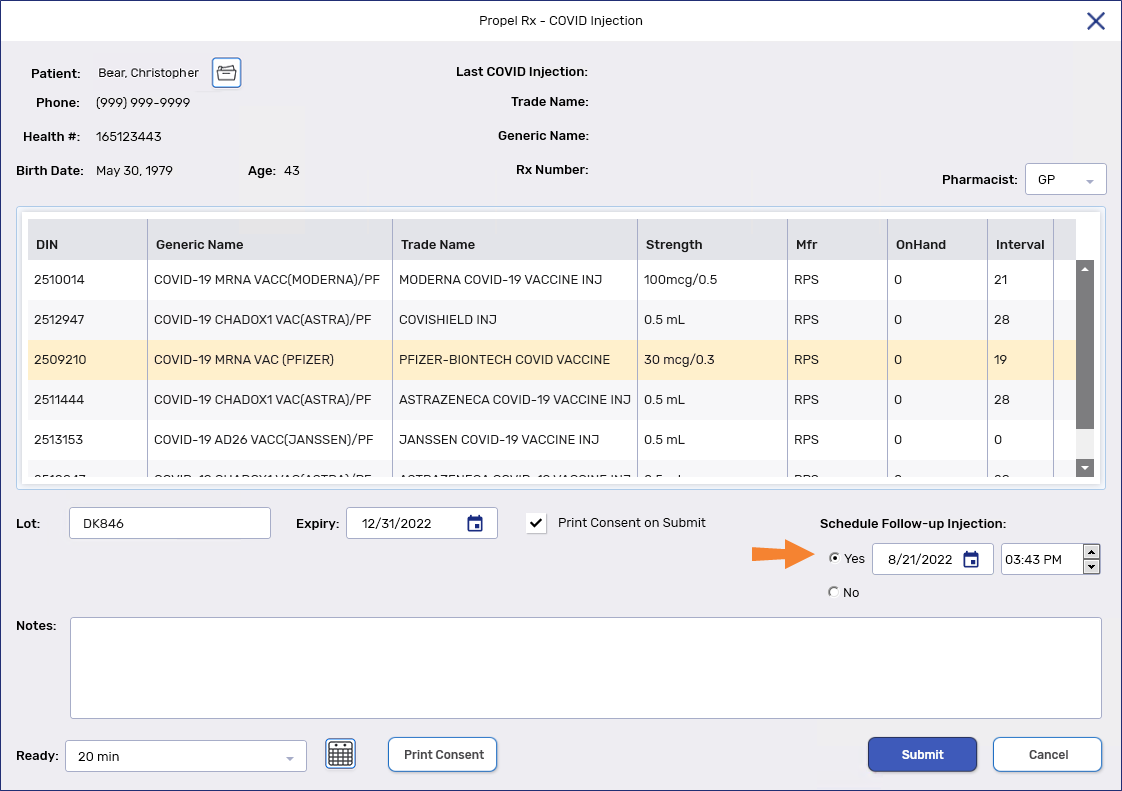
In the follow-up section, you can select one of the following:
-
Yes - selected by default if this is the initial dose or the injection was processed from a COVID-19 injection activity. Upon selecting Submit, a COVID-19 Injection Follow-up activity is scheduled based on the recommended days between doses. You can manually change the follow-up date if required before selecting Submit. The activity and its details can be viewed from the Activities tile. The Comments section displays the patient's name, phone number, and COVID-19 vaccine for easy reference.

-
No - selected by default if this is a subsequent dose or the injection was processed from a COVID-19 Injection Follow-up activity. No follow-up activity is scheduled when the prescription is processed.
Additional Information
Hold, Escaped, or Cancelled Prescriptions
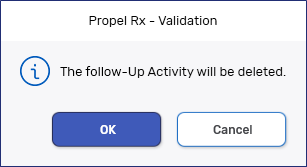
If you scheduled a follow-up activity from the COVID-19 Injection window but you escaped, cancelled, or placed the initial dose on hold, the following prompt displays:
-
OK - continues with the escape, hold, or cancellation process. The follow-up activity is removed from the Activities tile. If required, a new follow-up activity must be scheduled.
-
Cancel - stops the escape, hold, or cancellation process. The follow-up activity is not removed.
Prescriptions already in process
When trying to edit, delete, or process an activity but there is already a prescription in process, the following prompt displays:
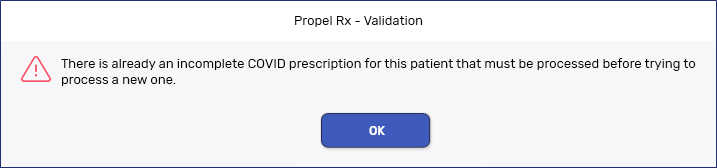
Locate the prescription on the Workbench or patient's Profile and continue to process the prescription as usual.